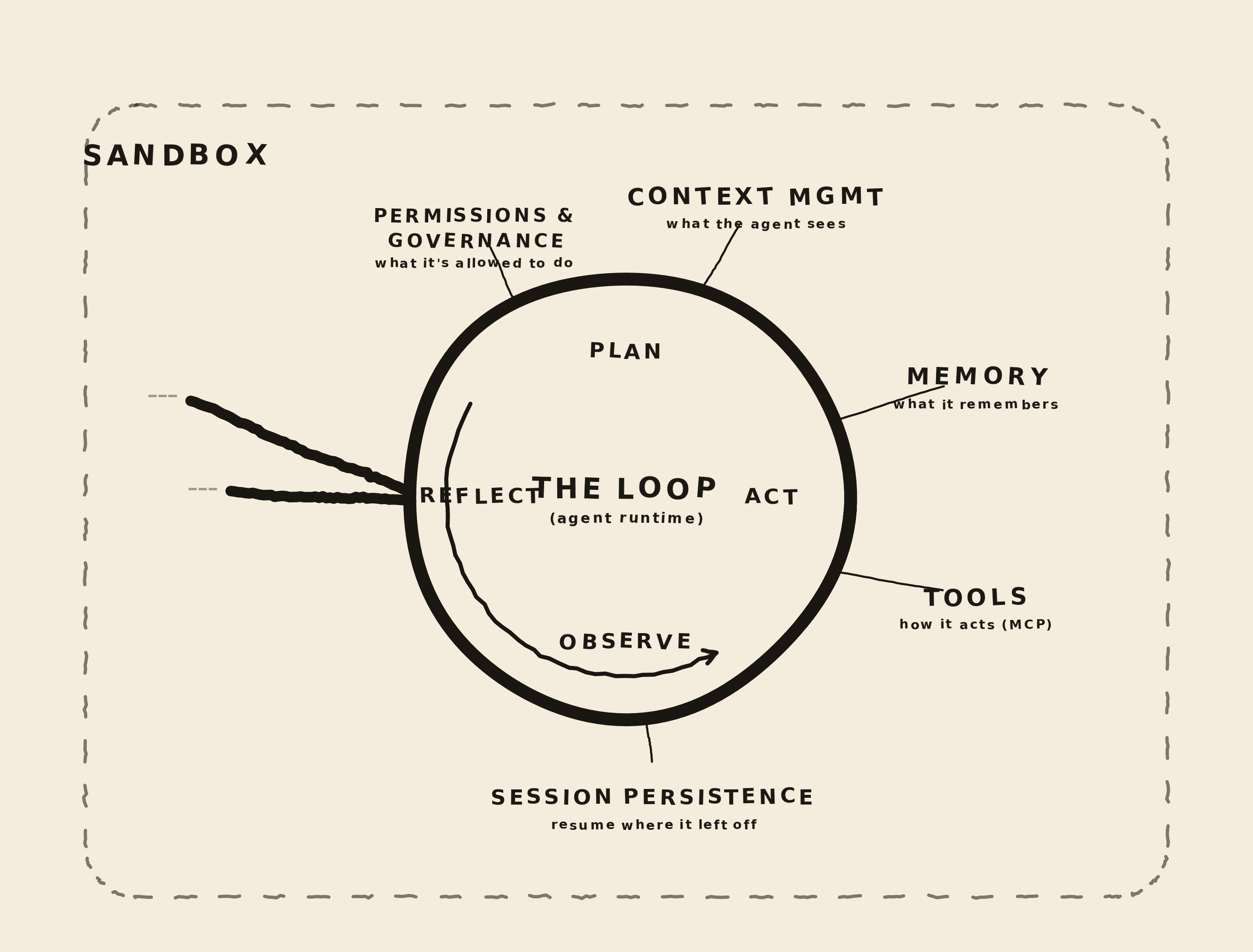
If you ever wondered what actually sits inside a coding agent, the answer is surprisingly small.
At the center of every coding agent is a loop:
messages = [system_prompt, user_task]

while True:
    response = model.chat(messages, tools=tools)
    messages.append(response.message)

    if not response.tool_calls:
        break

    for call in response.tool_calls:
        result = run_tool(call.name, call.arguments)
        messages.append(tool_result(call.id, result))
That is the primitive.
The model looks at the conversation and decides either:
- "I can answer now"
- or "I need to use a tool"
If it asks for a tool, the harness runs that tool and feeds the result back into the conversation. Then the model gets another chance.
Let's build the loop
You can reproduce this with one Python file and a local model running in LM Studio (serving and inference endpoint). The goal is not to build a polished agent yet. The goal is to see a model ask for a tool, run that tool yourself, and feed the result back.
First, install LM Studio
- Install LM Studio from lmstudio.ai.
-
Open the model search and download a model that
supports tool calling. A simple coder model is all
you need. In LM Studio, search for
qwen3-coder-30band download a file your machine can run. -
I use
qwen/qwen3-coder-30b, but a smaller Qwen coder or instruct model is fine for this first loop. - Load the model in LM Studio.
- Open the Developer or Local Server tab and start the local server.
-
Keep the default OpenAI-compatible endpoint:
http://localhost:1234/v1.
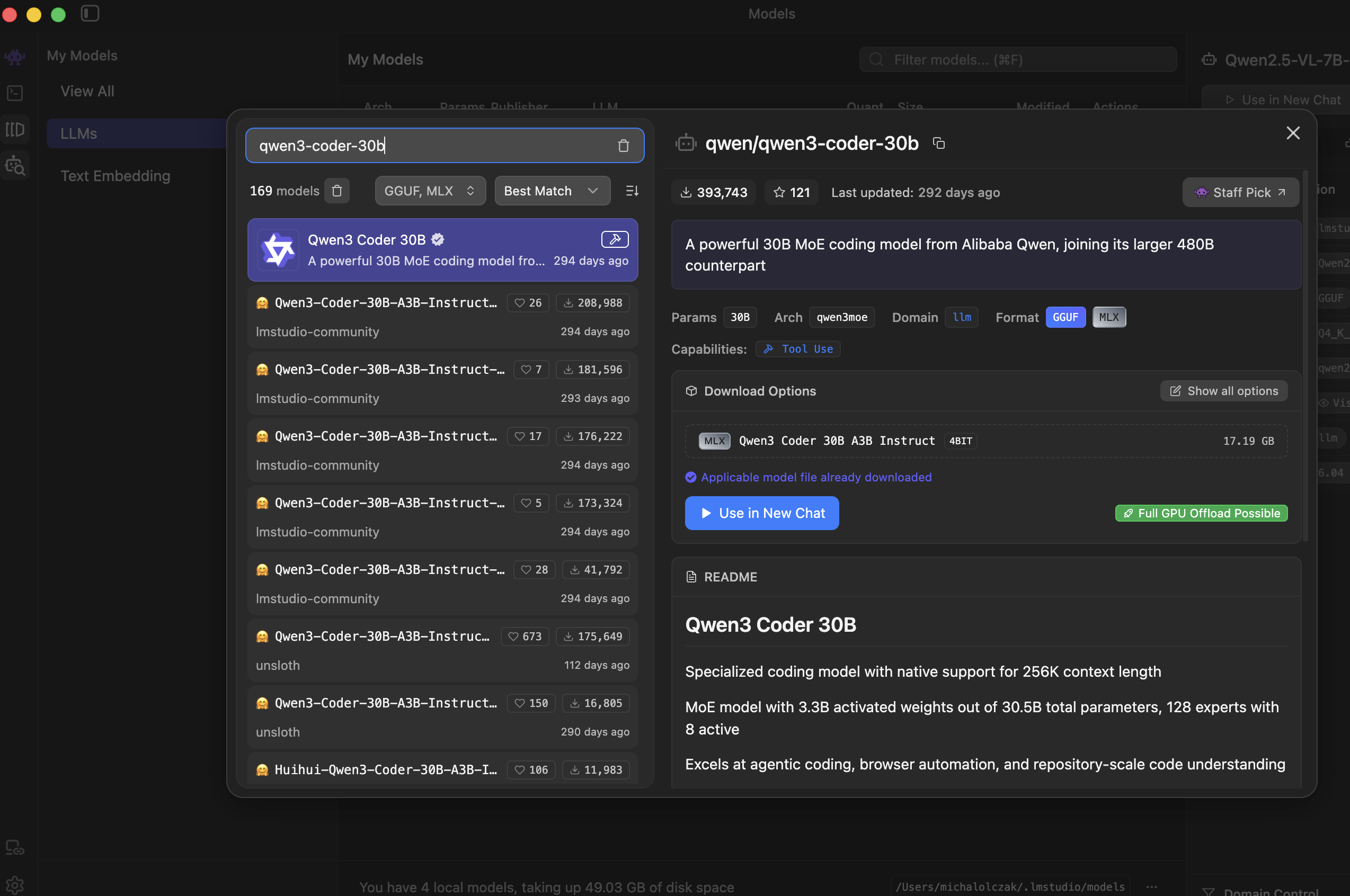
Tool Use, then download a
format and size that fits your machine.
If you are not sure what model id to use, once server is running ask LM Studio directly:
curl http://localhost:1234/v1/models
Copy the model id from that response. You will pass it
to the script below as LOOP_MODEL.
Create the Python project
mkdir the-loop
cd the-loop
python3 -m venv .venv
.venv/bin/python -m pip install openai
Create a file the agent can inspect:
echo "Loop is a tiny coding agent experiment." > notes.txtThen create loop.py:
import json
import os
from pathlib import Path

from openai import OpenAI


BASE_URL = os.getenv("LOOP_BASE_URL", "http://localhost:1234/v1")
API_KEY = os.getenv("LOOP_API_KEY", "lm-studio")
MODEL = os.getenv("LOOP_MODEL", "qwen/qwen3-coder-30b")
WORKSPACE = Path.cwd()

client = OpenAI(base_url=BASE_URL, api_key=API_KEY)


tools = [
    {
        "type": "function",
        "function": {
            "name": "list_dir",
            "description": "List files in the current workspace.",
            "parameters": {
                "type": "object",
                "properties": {
                    "path": {
                        "type": "string",
                        "description": "Directory path relative to the workspace.",
                    }
                },
                "required": ["path"],
            },
        },
    },
    {
        "type": "function",
        "function": {
            "name": "read_file",
            "description": "Read a text file from the current workspace.",
            "parameters": {
                "type": "object",
                "properties": {
                    "path": {
                        "type": "string",
                        "description": "File path relative to the workspace.",
                    }
                },
                "required": ["path"],
            },
        },
    },
]


def safe_path(path: str) -> Path:
    resolved = (WORKSPACE / path).resolve()
    if not resolved.is_relative_to(WORKSPACE):
        raise ValueError("Path escapes the workspace")
    return resolved


def list_dir(path: str) -> str:
    target = safe_path(path)
    return "\n".join(sorted(p.name for p in target.iterdir()))


def read_file(path: str) -> str:
    return safe_path(path).read_text()


def run_tool(name: str, arguments: dict) -> str:
    if name == "list_dir":
        return list_dir(arguments["path"])
    if name == "read_file":
        return read_file(arguments["path"])
    return f"Unknown tool: {name}"


messages = [
    {
        "role": "system",
        "content": (
            "You are a tiny coding agent. Use tools when you need to inspect "
            "the workspace. When you have enough information, answer clearly."
        ),
    },
    {
        "role": "user",
        "content": "What files are here, and what does notes.txt say?",
    },
]


while True:
    response = client.chat.completions.create(
        model=MODEL,
        messages=messages,
        tools=tools,
        tool_choice="auto",
    )

    message = response.choices[0].message
    messages.append(message.model_dump(exclude_none=True))

    if message.content:
        print("\nassistant:")
        print(message.content)

    if not message.tool_calls:
        break

    for tool_call in message.tool_calls:
        name = tool_call.function.name
        arguments = json.loads(tool_call.function.arguments or "{}")

        print(f"\ntool call: {name}({arguments})")
        result = run_tool(name, arguments)
        print(f"tool result:\n{result}")

        messages.append(
            {
                "role": "tool",
                "tool_call_id": tool_call.id,
                "content": result,
            }
        )
Run it
If your model id is different, set it before running:
export LOOP_MODEL="paste-your-lm-studio-model-id-here"
.venv/bin/python loop.py
You should see something like this:
tool call: list_dir({'path': '.'})
tool result:
notes.txt
loop.py

tool call: read_file({'path': 'notes.txt'})
tool result:
Loop is a tiny coding agent experiment.

assistant:
The workspace contains notes.txt and loop.py. notes.txt says:
"Loop is a tiny coding agent experiment."
That is the most basic and most important primitive for
us. Notice the model did not read the file. It
asked for read_file. Your Python harness
read the file, appended the tool result, and gave the
model another turn.
If the model answers without calling tools, try a model with stronger tool-calling support or make the task more explicit: "Use your tools to inspect the workspace before answering." Local models vary a lot here.
So now you know why this project is called The Loop.
Key takeaway is that the model is not really "doing" file operations. The harness is. The model emits structured intent:
{
  "name": "read_file",
  "arguments": {
    "path": "loop_cli/agent.py"
  }
}
Then our code decides what that means. The model reasons and proposes.
Everything after that is engineering:
- tools
- permissions
- context management
- memory
- workspace boundaries
- CLI UX
- tests
- evals
In harness terms, this first loop is only the heartbeat. It can call a model, receive a tool request, run a little code, and feed the result back. It does not yet have a serious environment, durable state, verification, or product-level permissions.
Now that we know the model cannot read a file, write code, or run a command by itself. It can only ask. In the next post, we will make that boundary explicit and look at tools as the model's hands.