In the last post, we made the harness responsible for deciding what happens after a model asks for a tool. Now we need to decide where those tools are allowed to act.
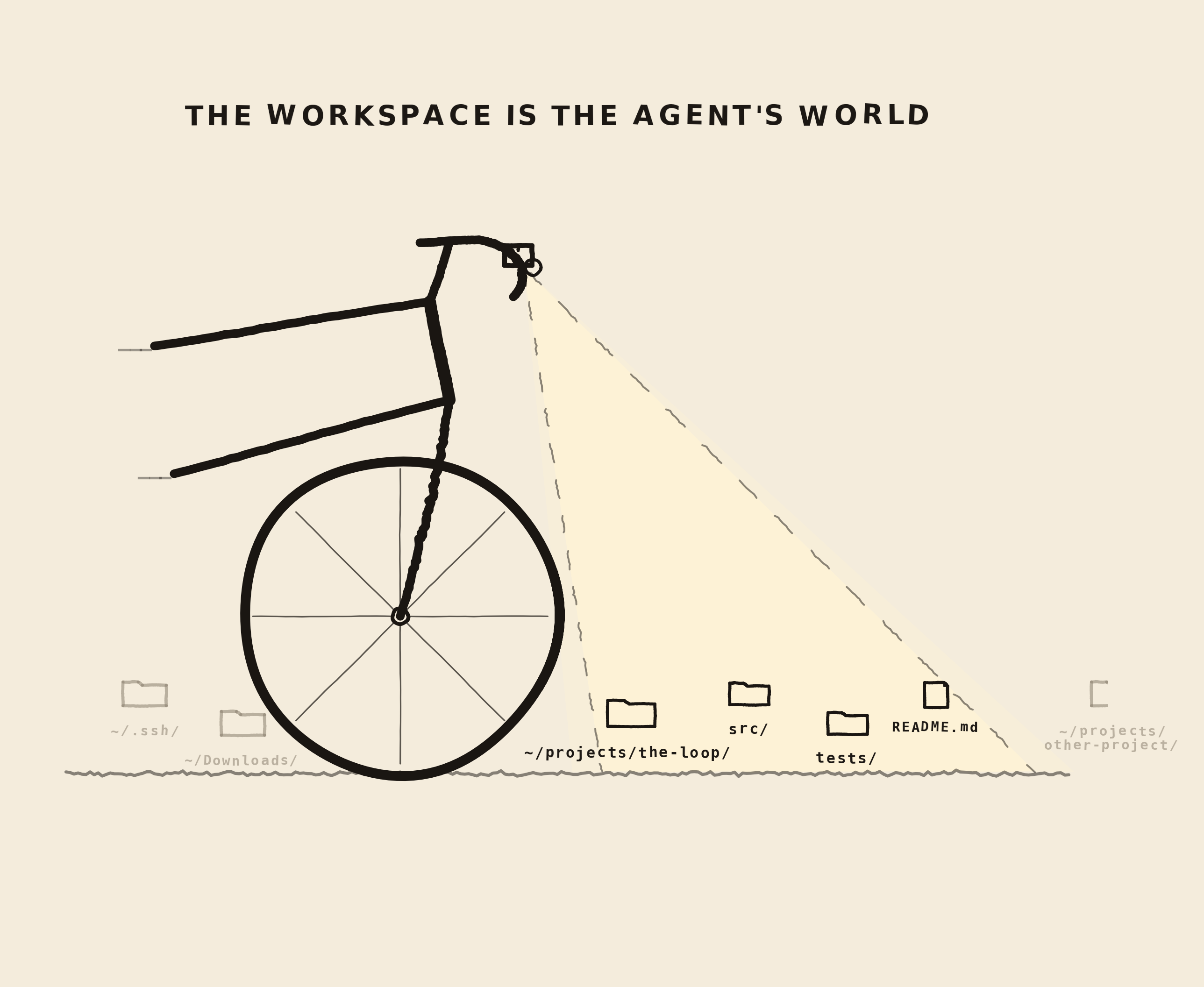
The workspace is the project root from the agent's point of view. It is the world the agent can inspect, edit, and reason about.
workspace/
  notes.txt
  loop.py
  src/
  tests/
This sounds simple, but it is quite important choice in a coding agent. The workspace is both context and boundary.
The workspace gives context and boundaries
Context means the workspace tells the agent what project it is in. The files, folders, tests, docs, and config are the raw material the model uses to understand the task.
Boundary means the workspace also tells the agent where
it is allowed to act. If the agent is working on
~/projects/the-loop, it should not casually
read or write ~/Downloads,
~/.ssh, or another project next door.
The model can ask for many paths. The harness has to decide which paths belong to the workspace.
The repo is the agent's map
There is another reason the workspace matters. For the agent, the repository is the map. If an architecture rule, setup command, testing habit, or product constraint is not written down somewhere the agent can read, the agent usually has to guess.
This is not a call to write giant documentation files. Long docs can be just as invisible if they are in the wrong place. The useful habit is to keep important project knowledge close to the code it affects.
workspace/
  AGENTS.md
  PROGRESS.md
  DECISIONS.md
  src/
    api/
      ARCHITECTURE.md
  tests/
AGENTS.md can tell the agent what this
project is, how to run it, and what rules matter
everywhere. Smaller notes near code can explain local
constraints: this API must stay backward compatible,
this migration must be reversible, this module owns that
behavior.
Relative paths can lie
The simplest rule is: tools receive paths relative to the workspace.
{
  "name": "read_file",
  "arguments": {
    "path": "src/agent.py"
  }
}
The tool should not receive an absolute path like
/Users/michalolczak/.ssh/id_rsa. It should
receive src/agent.py, and the harness
should resolve that path under the configured workspace.
WORKSPACE = Path.cwd()


def safe_path(path: str) -> Path:
    resolved = (WORKSPACE / path).resolve()
    if not resolved.is_relative_to(WORKSPACE):
        raise ToolError(
            "permission",
            "Path escapes the workspace.",
            retryable=False,
        )
    return resolved
This is path containment. It is the first safety boundary for file tools.
Resolve paths before you trust them
A path can look harmless and still escape.
../../somewhere/else/secrets.txtIf you simply join strings, the agent can step outside the project. Resolve the path first, then check whether the resolved path is still inside the workspace.
requested = "../../somewhere/else/secrets.txt"
resolved = (WORKSPACE / requested).resolve()

if not resolved.is_relative_to(WORKSPACE):
    raise ToolError("permission", "Path escapes the workspace.", False)
The model may not be malicious. The user may not be malicious. But bugs, vague prompts, bad tool arguments, and strange model outputs happen. The harness should not need everyone to behave perfectly.
Run from the right folder
For the educational version, the easiest workspace rule is: run Loop in the folder you want it to inspect and edit.
cd ~/Projects/my-agent-experiment
.venv/bin/python loop.py
Then Path.cwd() becomes the workspace.
Later, when we build the CLI, we can make this explicit:
.venv/bin/python loop.py --workspace ./workspaceThat flag changes the agent's world like where files are found and what the agent is allowed to touch.
Show the agent what matters
A workspace can contain useful files and a lot of noise: virtual environments, build outputs, caches, vendored dependencies, lockfiles, screenshots, and logs.
If list_dir dumps everything, the model has
to spend context on junk. The file tools should help the
model see the project.
IGNORED_NAMES = {
    ".git",
    ".venv",
    "__pycache__",
    "node_modules",
    "dist",
    "build",
}


def list_dir(path: str) -> list[str]:
    target = safe_path(path)
    return sorted(
        p.name
        for p in target.iterdir()
        if p.name not in IGNORED_NAMES
    )
This is not a full context-management system yet. It is a small habit: do not feed the model clutter by default.
The workspace shapes the agent's thinking
The workspace is not just where the agent works. It is what the agent believes the project is.
If the workspace is too small, the agent is blind. It may edit one package without seeing the tests, docs, or frontend code that depend on it. If the workspace is too large, the agent gets distracted, burns context, and may touch things it should not touch.
Different tasks want different scopes:
- a typo fix might need one folder
- an API change might need backend and frontend
- a docs update might need docs and source examples
- a migration might need app code, tests, and scripts
Choosing a workspace is therefore an agent-design decision. You are deciding how much of the world the model can see.
Try a fresh session
A simple way to test a workspace is to start a brand-new agent session, give it only the repository, and ask basic questions.
- What is this project?
- How is it organized?
- How do I run it?
- How do I verify it?
- What is currently in progress?
If the agent cannot answer, the workspace has blank spots. If it answers by reading ten unrelated files, the answer exists but has high discovery cost. Good workspace design lowers that cost.
Give the agent scratch space
Agents also need a place to be messy. Plans, temporary notes, intermediate files, command logs, and generated artifacts should not always land in the source tree.
This is where scratch space helps.
workspace/
  src/
  tests/
  .loop/
    PROGRESS.md
    DECISIONS.md
    scratch/
    logs/
    artifacts/
Think of the project workspace as the source of truth and the scratch workspace as the agent's desk. The desk can be messy. The source of truth should stay deliberate.
PROGRESS.md can describe what happened,
what is blocked, and what should happen next.
DECISIONS.md can record why a direction was
chosen. Scratch files can hold messy intermediate work.
The important distinction is that durable handoff state
is written down, while temporary notes remain, well..
temporary.
More agents need more workspaces
A single root is enough for our first loop, but real work often spans multiple areas. Instead of pretending everything is one giant folder, you can model separate workspaces with separate permissions.
source workspace   read/write   ./src
tests workspace    read/write   ./tests
docs workspace     read/write   ./docs
scratch workspace  read/write   ./.loop/scratch
secrets workspace  no access    ./secrets
That gives the harness a richer policy language. The agent can write to scratch freely, edit source with normal checks, and never read secrets. Same machine, different worlds.
The workspace can reach outside the repo
A workspace is the local world the agent can inspect and change, but production agents rarely live only in local files. They may also need to read issues, inspect CI runs, open pull requests, query logs, fetch docs, update tickets, or call internal APIs.
Those systems are not the workspace in the filesystem sense. They are better modeled as controlled doors out of the workspace. The same questions still apply: what can the agent see, what can it change, and what needs approval?
workspace  local files, tests, docs, artifacts
tools      controlled actions inside and outside the workspace
MCP        a standard way to expose external tools and context
policy     what is allowed, blocked, or requires confirmation
audit log  what the agent saw, changed, and attempted
This keeps the model simple. The workspace is still the main place where the agent does its work. External systems become explicit capabilities exposed through tools, with their own permissions and records.
Agents need shared state
Workspaces become even more important when more than one agent is involved. A planner agent, coding agent, review agent, and test agent need some way to coordinate.
The simplest shared state is files:
- task notes
- plans
- patches
- test reports
- review comments
But shared state needs rules. Otherwise agents overwrite each other's work, trust stale notes, or treat a draft as truth. The workspace is not only a filesystem location; it is also a coordination surface.
Later, when more than one agent can work at the same time, this becomes a worktree problem. One workspace is fine for one agent. Parallel agents need isolated checkouts, separate branches, and a clear place to hand work back for review.
Enterprise work needs boundaries
In a company, workspace boundaries often map to access boundaries. A team may be allowed to edit one service but not another. Customer data may live near source code but require different permissions. Production config may be visible to humans but not to an autonomous tool.
This is where workspace design starts touching security, ownership, and compliance:
- which repos can this agent mount?
- which directories are read-only?
- which files should be redacted?
- which actions need audit logs?
- which teams own which roots?
A good workspace model makes those boundaries concrete instead of leaving them as vague instructions in a prompt.
Write down the workspace contract
One way to make workspace design explicit is a small manifest. For now this is just a hint at where the series is going.
name: build-the-loop
roots:
  source:
    path: ./src
    access: read_write
  tests:
    path: ./tests
    access: read_write
  docs:
    path: ./docs
    access: read_write
scratch: ./.loop/scratch
ignored:
  - .venv
  - node_modules
  - dist
Workspace is not the same as sandbox
There is a caveat. Workspace boundaries are good for
file tools because every file operation goes through
safe_path.
Bash is different.
A shell command starts in the workspace, but it can change directories, call other programs, read environment variables, access the network, and do many things outside the neat path abstraction.
cd ..
cat another-project/.env
That is why workspace is not the same thing as a full sandbox. A workspace is the first boundary. A sandbox is a stronger execution environment.
What the sandbox adds
A workspace answers: which files belong to this project? A sandbox answers a stronger question: what can this process actually do?
That distinction matters most once you add a shell tool.
This request can be blocked by safe_path:
read_file("../secret.txt")
But this command does not go through
safe_path at all:
python -c "from pathlib import Path; print(Path('../secret.txt').read_text())"
If the harness allows arbitrary run_bash,
the workspace boundary is no longer enough. The command
can start inside the workspace and still reach outside
it.
A sandbox adds controls around the process itself:
- mount only the workspace
- make most files read-only
- remove sensitive environment variables
- disable or restrict network access
- set CPU, memory, and time limits
- kill the full process tree on timeout
- record commands, exits, stdout, and stderr
We are not building that sandbox yet. For now, the important idea is the separation: workspace is project scope; sandbox is execution control.
The loop so far
Here is the full loop so far as a single file. It keeps
the same LM Studio setup, but now the file tools resolve
paths through the workspace and list_dir
filters obvious noise.
import json
import os
from pathlib import Path

from openai import OpenAI


BASE_URL = os.getenv("LOOP_BASE_URL", "http://localhost:1234/v1")
API_KEY = os.getenv("LOOP_API_KEY", "lm-studio")
MODEL = os.getenv("LOOP_MODEL", "qwen/qwen3-coder-30b")
WORKSPACE = Path.cwd().resolve()
MAX_TURNS = 8
MAX_TOOL_CALLS = 12

client = OpenAI(base_url=BASE_URL, api_key=API_KEY)

IGNORED_NAMES = {
    ".git",
    ".venv",
    "__pycache__",
    "node_modules",
    "dist",
    "build",
}


class ToolError(Exception):
    def __init__(self, error_type: str, message: str, retryable: bool):
        self.error_type = error_type
        self.message = message
        self.retryable = retryable


def safe_path(path: str) -> Path:
    resolved = (WORKSPACE / path).resolve()
    if not resolved.is_relative_to(WORKSPACE):
        raise ToolError(
            "permission",
            "Path escapes the workspace.",
            retryable=False,
        )
    return resolved


def list_dir(path: str) -> list[str]:
    target = safe_path(path)
    return sorted(
        p.name
        for p in target.iterdir()
        if p.name not in IGNORED_NAMES
    )


def read_file(path: str) -> str:
    target = safe_path(path)
    return target.read_text(encoding="utf-8")


def write_file(path: str, content: str) -> str:
    target = safe_path(path)
    target.parent.mkdir(parents=True, exist_ok=True)
    target.write_text(content, encoding="utf-8")
    return f"Wrote {path}"


TOOL_FUNCTIONS = {
    "list_dir": list_dir,
    "read_file": read_file,
    "write_file": write_file,
}

REQUIRED_ARGUMENTS = {
    "list_dir": ["path"],
    "read_file": ["path"],
    "write_file": ["path", "content"],
}

tools = [
    {
        "type": "function",
        "function": {
            "name": "list_dir",
            "description": (
                "List visible files and folders inside the workspace. "
                "Use this to inspect project structure. "
                "Path must be relative to the workspace."
            ),
            "parameters": {
                "type": "object",
                "properties": {
                    "path": {
                        "type": "string",
                        "description": "Directory path relative to the workspace.",
                    }
                },
                "required": ["path"],
            },
        },
    },
    {
        "type": "function",
        "function": {
            "name": "read_file",
            "description": (
                "Read a UTF-8 text file from the workspace. "
                "Use this when you need exact file contents. "
                "Path must be relative to the workspace."
            ),
            "parameters": {
                "type": "object",
                "properties": {
                    "path": {
                        "type": "string",
                        "description": "File path relative to the workspace.",
                    }
                },
                "required": ["path"],
            },
        },
    },
    {
        "type": "function",
        "function": {
            "name": "write_file",
            "description": (
                "Write a UTF-8 text file inside the workspace. "
                "Use this only when the task requires changing or creating a file. "
                "Path must be relative to the workspace."
            ),
            "parameters": {
                "type": "object",
                "properties": {
                    "path": {
                        "type": "string",
                        "description": "File path relative to the workspace.",
                    },
                    "content": {
                        "type": "string",
                        "description": "Complete text content to write.",
                    },
                },
                "required": ["path", "content"],
            },
        },
    },
]


def parse_arguments(raw_arguments: str) -> dict:
    try:
        return json.loads(raw_arguments or "{}")
    except json.JSONDecodeError as error:
        raise ToolError(
            "invalid_tool_arguments",
            f"Arguments were not valid JSON: {error}",
            retryable=True,
        )


def require(arguments: dict, *names: str) -> None:
    missing = [name for name in names if name not in arguments]
    if missing:
        raise ToolError(
            "missing_arguments",
            f"Missing required arguments: {', '.join(missing)}",
            retryable=True,
        )


def validate_tool_call(name: str, arguments: dict) -> None:
    if name not in REQUIRED_ARGUMENTS:
        raise ToolError("unknown_tool", f"Unknown tool: {name}", False)
    require(arguments, *REQUIRED_ARGUMENTS[name])


def check_policy(name: str, arguments: dict) -> dict:
    if name == "write_file":
        path = arguments.get("path", "")
        if path.startswith(".loop/"):
            return {
                "ok": False,
                "tool": name,
                "error_type": "permission",
                "message": "The agent may not write into .loop internal state.",
                "retryable": False,
            }
    return {"ok": True}


def normalize_result(name: str, result) -> dict:
    return {"ok": True, "tool": name, "result": result}


def error_result(name: str, error: ToolError) -> dict:
    return {
        "ok": False,
        "tool": name,
        "error_type": error.error_type,
        "message": error.message,
        "retryable": error.retryable,
    }


def execute_tool(name: str, arguments: dict):
    return TOOL_FUNCTIONS[name](**arguments)


def handle_tool_call(tool_call) -> dict:
    name = tool_call.function.name
    try:
        arguments = parse_arguments(tool_call.function.arguments)
        validate_tool_call(name, arguments)
        policy = check_policy(name, arguments)
        if not policy["ok"]:
            return policy
        result = execute_tool(name, arguments)
        return normalize_result(name, result)
    except ToolError as error:
        return error_result(name, error)


def log_event(event: dict) -> None:
    print(json.dumps(event))


def call_model(messages: list[dict]):
    response = client.chat.completions.create(
        model=MODEL,
        messages=messages,
        tools=tools,
        tool_choice="auto",
    )
    return response.choices[0].message


def run_agent(messages: list[dict]) -> dict:
    tool_call_count = 0
    stop_reason = "max_turns"

    for turn in range(MAX_TURNS):
        log_event({"type": "model_call", "turn": turn})
        message = call_model(messages)
        messages.append(message.model_dump(exclude_none=True))

        if message.content:
            print("\nassistant:")
            print(message.content)

        if not message.tool_calls:
            stop_reason = "final_answer"
            break

        for tool_call in message.tool_calls:
            tool_call_count += 1
            if tool_call_count > MAX_TOOL_CALLS:
                stop_reason = "tool_budget_exceeded"
                break

            result = handle_tool_call(tool_call)
            log_event(
                {
                    "type": "tool_result",
                    "turn": turn,
                    "tool": result.get("tool"),
                    "ok": result["ok"],
                    "error_type": result.get("error_type"),
                }
            )

            messages.append(
                {
                    "role": "tool",
                    "tool_call_id": tool_call.id,
                    "content": json.dumps(result),
                }
            )

        if stop_reason != "max_turns":
            break

    return {
        "messages": messages,
        "stop_reason": stop_reason,
        "tool_call_count": tool_call_count,
    }


messages = [
    {
        "role": "system",
        "content": (
            "You are a tiny coding agent. Use tools when you need to inspect "
            "or change the workspace. Paths must stay inside the workspace. "
            "When you have enough information, answer clearly."
        ),
    },
    {
        "role": "user",
        "content": (
            "Inspect notes.txt, then write a short summary to summary.txt. "
            "After writing it, read summary.txt back to confirm what you wrote."
        ),
    },
]


result = run_agent(messages)
print(f"Stopped because: {result['stop_reason']}")
To try it, keep LM Studio running, create
notes.txt in the same folder, then run
.venv/bin/python loop.py.
Where we are now
The workspace is the agent's world. It tells the agent what project it is in, what it can inspect, and where it can act.
Path containment gives file tools their first safety boundary. But the next question is more subtle: which actions should be allowed, which should be blocked, and which should ask the user first?
That is where permissions become product design. Stay tuned.