The first two posts gave us the primitive: a model can ask for tools, and our code can run those tools. If you want to revisit that foundation, start with the smallest coding agent loop and then tools as the model's hands. That is enough for a demo. It is not yet enough for an agent you can trust.
The harness is the deterministic layer around the model. It owns the boring but decisive parts: parsing, validation, policy, execution, state, logging, limits, and results.
Or to put it simply: the harness is the program around the model call.
model response
  1. extract tool calls
  2. validate arguments
  3. apply policy
  4. execute tool
  5. normalize result
  6. append to history
  7. continue or stop
This is the layer where a basic loop starts becoming a real system.
One useful way to name that system is to split the harness into five parts:
instructions  what the agent should know
tools         what it can do
environment   where it runs
state         what survives between turns or sessions
feedback      how it learns whether work succeeded
Our tiny harness does not have mature versions of all five yet, but the shape is already visible. The tool pipeline is tools. The workspace is environment. Message history is state. Logs and tool results are feedback. The system prompt is instructions.
The brake matters
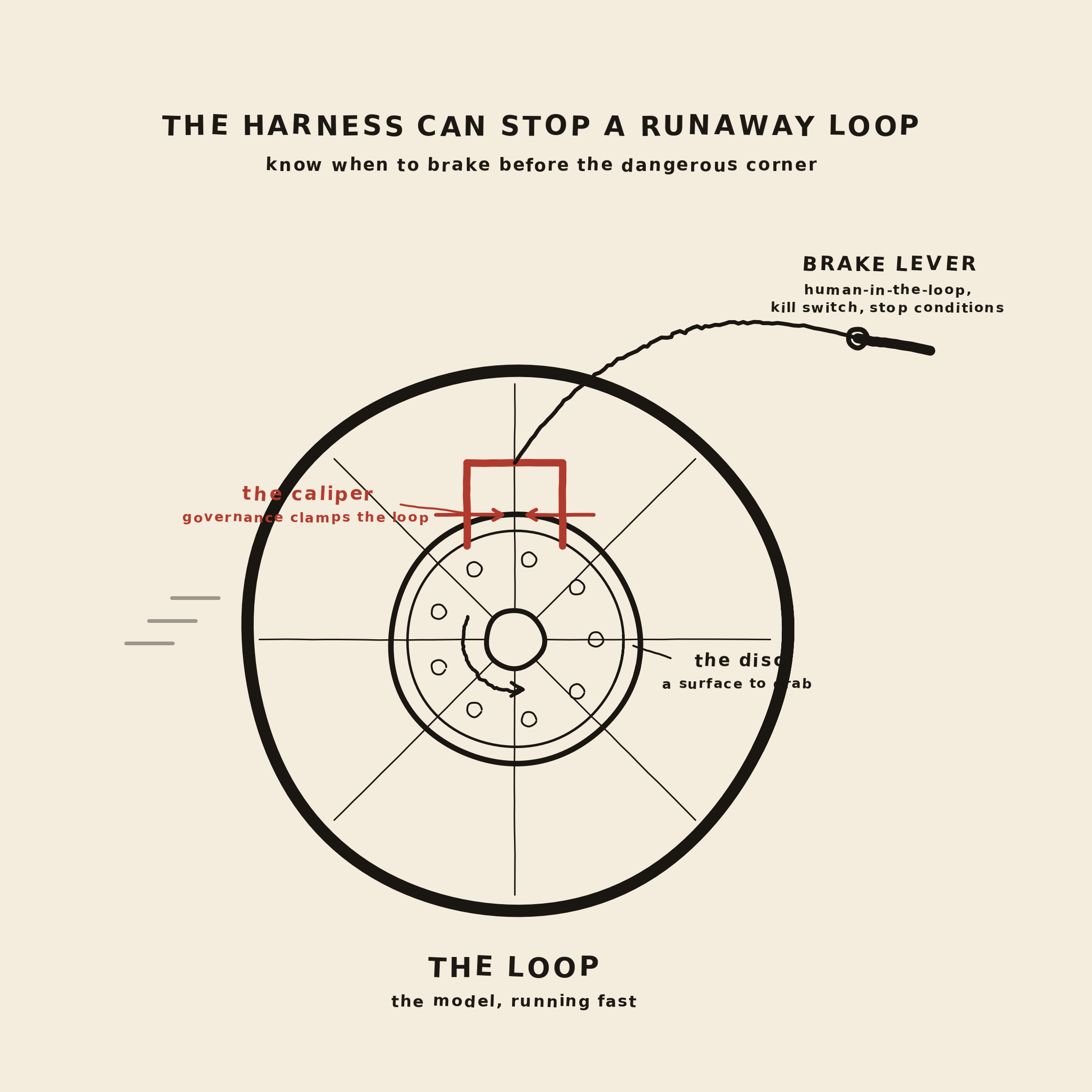
Have a look at the image above. The loop is the wheel: once it starts turning, the model can keep asking, observing, and asking again. That motion (and modern agent systems will boast about how many hours or days it can run uninterrupted) is what makes agents useful. This is also what makes them risky.
The harness is the brake system around the wheel. It gives the loop some friction, limits, and places where a human or a rule can stop the motion when desired.
- The brake lever is the human-in-the-loop: approval, pause, cancel, and kill switch.
- The caliper is governance: policy checks that clamp down before risky actions run.
- The disc is the execution surface: the place where tool calls become visible, inspectable actions.
A good harness lets the model move quickly when the action is safe, and brake hard when the action needs scrutiny.
The harness is not just glue
It is tempting to think of the harness as glue code between a model and a few functions. However the harness decides what actually happens after a model emits a tool call.
A model can produce a request like this:
{
  "name": "write_file",
  "arguments": {
    "path": "summary.txt",
    "content": "The loop is working."
  }
}
But the request is not the action. The harness still has to answer several questions:
- Is
write_filea known tool? - Are the arguments valid and complete?
- Does the path stay inside the workspace?
- Is this operation allowed automatically?
- Should the user confirm it first?
- How should success or failure be returned?
- Should the loop continue?
These are not prompt-writing details. They are product and architecture decisions.
Start simple
Anthropic's guidance on building effective agents argues for simple, composable patterns before reaching for complicated frameworks. That is exactly what we are doing here. We want to start with a harness you can read in one sitting and add layers only when we can name the problem they solve.
Frameworks can be useful later, but they can also hide the things you most need to understand: what prompt was sent, what tool call came back, what code ran, and what result was returned.
The harness is also where you decide what should be a fixed workflow and what should be model-directed. If a rule is deterministic, keep it in code. Let the model choose among safe options; do not make it responsible for enforcing the safety of those options.
A workflow is something like: always parse the arguments, always validate the path, always check policy before writing. The model does not need to decide those steps. They should be engineered to happen every time.
The agentic part is different: should we read
README.md first or inspect the tests?
Should we call read_file or answer now?
Those are choices the model can make inside the safe
surface the harness provides.
The tool call pipeline
A useful way to structure the harness is as a pipeline. Every tool call goes through the same gates.
def handle_tool_call(tool_call) -> dict:
    name = tool_call.function.name

    try:
        arguments = parse_arguments(tool_call.function.arguments)
        validate_tool_call(name, arguments)
        policy = check_policy(name, arguments)

        if not policy["ok"]:
            return policy

        result = execute_tool(name, arguments)
        return normalize_result(name, result)
    except ToolError as error:
        return error_result(name, error)
That pipeline is the architecture. The details will
change, but the order matters: parse before validating,
validate before policy, policy before execution, and
normalize before returning anything to the model. In
this sketch, execute_tool calls the actual
tool implementation, and
normalize_result wraps raw output into the
result contract we will use below.
Make one thing finish
The harness also protects the task boundary. A model can easily start doing "one more related thing": write the file, then refactor the helper, then reorganize tests, then update docs. That feels productive until nothing is actually finished.
A good default for agents is WIP=1: one active unit of work at a time. Finish the current thing, verify it, then move on. This is not about making the model less capable. It is about keeping its attention on a task small enough to complete.
Ask for evidence
The harness should also define what "done" means. Done is not "the model says it looks good." Done is evidence: a file exists, a command passed, a test returned the expected result, or the tool read back the thing it just wrote.
{
  "task": "write summary.txt",
  "evidence": [
    "write_file returned ok=true",
    "read_file('summary.txt') returned the expected content"
  ],
  "state": "passing"
}
For our tiny loop, the evidence is simple: after writing
summary.txt, read it back. In a larger agent,
completion evidence might be a test command, a build, a
screenshot, or an end-to-end check.
Validate before you run anything
Some providers can enforce tool schemas very strongly. Some local model servers are more best-effort. Either way, the harness should still validate what it receives. The tool schema helps the model produce a good request; validation protects your runtime.
We need one internal error type so parsing, validation, policy, and execution failures can all become the same result shape before they go back to the model.
class ToolError(Exception):
    def __init__(self, error_type: str, message: str, retryable: bool):
        self.error_type = error_type
        self.message = message
        self.retryable = retryable
def parse_arguments(raw_arguments: str) -> dict:
try:
return json.loads(raw_arguments or "{}")
except json.JSONDecodeError as error:
raise ToolError(
"invalid_tool_arguments",
f"Arguments were not valid JSON: {error}",
retryable=True,
)After parsing, validate the shape.
def require(arguments: dict, *names: str) -> None:
missing = [name for name in names if name not in arguments]
if missing:
raise ToolError(
"missing_arguments",
f"Missing required arguments: {', '.join(missing)}",
retryable=True,
)
Notice the word retryable. Bad JSON or a
missing argument may be recoverable. The model can try
again if the harness reports the problem clearly. A
permission failure is different.
REQUIRED_ARGUMENTS = {
"list_dir": ["path"],
"read_file": ["path"],
"write_file": ["path", "content"],
}
def validate_tool_call(name: str, arguments: dict) -> None:
if name not in REQUIRED_ARGUMENTS:
raise ToolError("unknown_tool", f"Unknown tool: {name}", False)
require(arguments, *REQUIRED_ARGUMENTS[name])Validation is not policy
Validation and policy are similar, but different. They answer different questions.
- Validation asks: is this request well-formed?
- Policy asks: even if it is well-formed, are we allowed to do it?
# validation failure
write_file({"path": "summary.txt"})
# missing required content
# policy failure
write_file({
"path": "../outside.txt",
"content": "hello"
})
# well-formed, but outside the workspaceThat distinction matters because the recovery is different. A validation failure may be retryable with better arguments. A policy failure usually means the model should stop, choose another path, or ask the user.
Policy comes before action
The most important harness rule is this: do not rely on the model prompt for safety-critical constraints. If an action must be blocked, checked, or confirmed, put that rule in code.
The system prompt can say "stay inside the workspace." The harness must enforce it.
def safe_path(path: str) -> Path:
resolved = (WORKSPACE / path).resolve()
if not resolved.is_relative_to(WORKSPACE):
raise ToolError(
"permission",
"Path escapes the workspace.",
retryable=False,
)
return resolvedPolicy also includes product choices. Reading a file may be allowed automatically. Writing a file may be allowed only inside the project. Deleting a file may require confirmation. Running shell commands may need a timeout and an allowlist.
POLICY = {
"list_dir": {"confirm": False},
"read_file": {"confirm": False},
"write_file": {"confirm": False},
"run_bash": {"confirm": True, "timeout_seconds": 30},
}A policy check should return a normal tool result, not crash the program. The model asked for something. The harness rejected it and explains why.
{
"ok": false,
"tool": "write_file",
"error_type": "policy_violation",
"retryable": false,
"message": "Refusing to write outside the workspace."
}Here is a slightly more concrete version. This policy blocks writes outside the workspace, blocks deletes, and requires human approval before running shell commands.
def check_policy(name: str, arguments: dict) -> dict:
if name in {"read_file", "write_file", "list_dir"}:
safe_path(arguments["path"])
if name == "delete_file":
return {
"ok": False,
"error_type": "policy_violation",
"retryable": False,
"message": "delete_file is not allowed in this harness.",
}
if name == "run_bash":
return {
"ok": False,
"error_type": "confirmation_required",
"retryable": False,
"message": "Running shell commands requires human approval.",
}
return {"ok": True}This is governance in the harness. No drama, no argument with the model, no best-effort instruction. The requested action either passes policy or returns a structured refusal.
Internally, the harness can raise errors or return policy results. The important part is that everything is normalized into the same result envelope before it goes back to the model.
We are not implementing the interactive confirmation UI in this post. For now, the harness simply refuses the action and reports that approval is required. Later in the series, Permissions Are Product Design will go deeper on which operations should be allowed, blocked, or escalated. When we turn the loop into a CLI, we will build the user-confirmation flow around this exact policy decision.
tool call
-> policy says confirmation_required
-> CLI asks the user
-> user approves or denies
-> harness runs or returns refusal
-> result goes back into the loopThis is the caliper from the image. Governance should clamp down at the point of action, before the tool runs, not after the model has already done the damage.
Guard the tool boundary
Guardrails are often discussed as checks on user input or final output. Those can be useful, but tool-using agents have another important boundary: every tool call.
The OpenAI Agents SDK guardrails docs make a similar distinction: input guardrails, output guardrails, and tool guardrails live at different workflow boundaries. For this series let's focus on essentials: if the risky thing is a tool call, put checks around the tool call.
If you care about what happens before a file is written, a command is run, or data leaves the system, guard the tool boundary. That means checks before execution and, sometimes, checks after execution before the result is shown to the model or user.
The useful rule of thumb: prompts request behavior; harness checks enforce behavior.
Tool results are a contract
The harness also decides how tool results are shaped. Plain strings are fine for a first demo. As soon as the agent needs to recover from errors, structured results become much better.
{
"ok": true,
"tool": "write_file",
"path": "summary.txt",
"message": "Wrote 20 characters."
}Errors should be structured too:
{
"ok": false,
"tool": "read_file",
"error_type": "permission",
"retryable": false,
"message": "Path escapes the workspace."
}This gives the model a signal. Invalid JSON means it can try again with better arguments. A permission error means it should stop or ask the user. A transient error may be worth retrying. A valid empty result should not be treated as a failure.
History is already state
In our tiny loop, messages is the agent's
state. The model does not remember a tool result unless
the harness appends it back into the conversation.
messages.append(
{
"role": "tool",
"tool_call_id": tool_call.id,
"content": json.dumps(result),
}
)That append is not bookkeeping. It is how the model observes the world. If a command failed and you do not include stderr, the model cannot reason about the failure. If a file was written and you do not include the path, the model has to guess.
Later, we will expand this into session storage, resumable runs, memory, and context management. For now, the important idea is simple: the harness chooses what becomes part of the next model input.
Give the loop a way to stop
Agents need limits. Without limits, a model can repeat the same tool call, keep trying to fix a failing command, or burn context after the task is already done.
MAX_TURNS = 12
MAX_TOOL_CALLS = 24
tool_call_count = 0
stop_reason = "max_turns"
for turn in range(MAX_TURNS):
message = call_model(messages)
messages.append(message)
if not message.tool_calls:
stop_reason = "final_answer"
break
for tool_call in message.tool_calls:
tool_call_count += 1
if tool_call_count > MAX_TOOL_CALLS:
stop_reason = "tool_budget_exceeded"
break
result = handle_tool_call(tool_call)
messages.append(tool_result(tool_call.id, result))
if stop_reason == "tool_budget_exceeded":
breakThe stop reason matters. "The model answered" is different from "we hit the tool budget" or "we blocked a dangerous action." The harness should know why the run ended.
Useful stop reasons include:
final_answermax_turnstool_budget_exceededrepeated_tool_callhuman_cancelledpolicy_violation
This is also where a kill switch belongs. A user should be able to stop a long run. The harness should also stop itself when it sees a budget, timeout, repeated action, or policy violation. A stop condition is not failure. It is the brake doing its job.
Make the run observable
If you cannot inspect a run, you cannot improve it. Frameworks call this tracing. In our tiny harness, it can start as simple logging.
def log_event(event: dict) -> None:
print(json.dumps(event, ensure_ascii=False))
log_event({
"type": "tool_call",
"tool": name,
"arguments": arguments,
"turn": turn,
})
log_event({
"type": "tool_result",
"tool": name,
"ok": result["ok"],
"error_type": result.get("error_type"),
})Log the model turn, tool name, arguments, result status, errors, duration, and stop reason. Be careful with secrets and sensitive file contents, but do not fly blind.
A useful event usually has fields like:
run_id, turn,
tool, duration_ms,
ok, error_type, and
stop_reason. That is enough to answer the
first debugging questions: what ran, how long did it
take, did it work, and why did the run stop?
In production, the usual direction is OpenTelemetry. OTel gives you a vendor-neutral way to emit traces, metrics, and logs. For an agent harness, the natural shape is one trace per run, with spans for the model call, each tool call, policy checks, retries, and final stop reason.
agent.run
model.call
tool.write_file
policy.workspace_check
tool.execute
model.call
agent.stopYou do not need OTel to understand the first harness. Start with structured logs. But design the events so they could become traces later: stable names, useful attributes, durations, error types, and a run id that ties the whole loop together.
The loop so far
Here is the full loop.py with the harness
ideas from this post folded in: validation, policy,
structured results, logging, tool budgets, and stop
reasons.
import json
import os
from pathlib import Path
from openai import OpenAI
BASE_URL = os.getenv("LOOP_BASE_URL", "http://localhost:1234/v1")
API_KEY = os.getenv("LOOP_API_KEY", "lm-studio")
MODEL = os.getenv("LOOP_MODEL", "qwen/qwen3-coder-30b")
WORKSPACE = Path.cwd()
MAX_TURNS = 12
MAX_TOOL_CALLS = 24
client = OpenAI(base_url=BASE_URL, api_key=API_KEY)
class ToolError(Exception):
def __init__(self, error_type: str, message: str, retryable: bool):
self.error_type = error_type
self.message = message
self.retryable = retryable
tools = [
{
"type": "function",
"function": {
"name": "list_dir",
"description": "List files in a workspace directory.",
"parameters": {
"type": "object",
"properties": {
"path": {
"type": "string",
"description": "Directory path relative to the workspace.",
}
},
"required": ["path"],
},
},
},
{
"type": "function",
"function": {
"name": "read_file",
"description": (
"Read a UTF-8 text file from the workspace. "
"Use this when you need exact file contents."
),
"parameters": {
"type": "object",
"properties": {
"path": {
"type": "string",
"description": "File path relative to the workspace.",
}
},
"required": ["path"],
},
},
},
{
"type": "function",
"function": {
"name": "write_file",
"description": "Write a UTF-8 text file inside the workspace.",
"parameters": {
"type": "object",
"properties": {
"path": {
"type": "string",
"description": "File path relative to the workspace.",
},
"content": {
"type": "string",
"description": "Complete text content to write.",
},
},
"required": ["path", "content"],
},
},
},
]
def log_event(event: dict) -> None:
print(json.dumps(event, ensure_ascii=False))
def safe_path(path: str) -> Path:
resolved = (WORKSPACE / path).resolve()
if not resolved.is_relative_to(WORKSPACE):
raise ToolError(
"permission",
"Path escapes the workspace.",
retryable=False,
)
return resolved
def list_dir(path: str) -> list[str]:
target = safe_path(path)
return sorted(p.name for p in target.iterdir())
def read_file(path: str) -> str:
return safe_path(path).read_text()
def write_file(path: str, content: str) -> dict:
target = safe_path(path)
target.write_text(content)
return {
"path": path,
"message": f"Wrote {len(content)} characters.",
}
TOOL_REGISTRY = {
"list_dir": lambda args: list_dir(args["path"]),
"read_file": lambda args: read_file(args["path"]),
"write_file": lambda args: write_file(args["path"], args["content"]),
}
REQUIRED_ARGUMENTS = {
"list_dir": ["path"],
"read_file": ["path"],
"write_file": ["path", "content"],
}
def parse_arguments(raw_arguments: str) -> dict:
    try:
        return json.loads(raw_arguments or "{}")
    except json.JSONDecodeError as error:
        raise ToolError(
            "invalid_tool_arguments",
            f"Arguments were not valid JSON: {error}",
            retryable=True,
        )
def require(arguments: dict, *names: str) -> None:
    missing = [name for name in names if name not in arguments]
    if missing:
        raise ToolError(
            "missing_arguments",
            f"Missing required arguments: {', '.join(missing)}",
            retryable=True,
        )
def validate_tool_call(name: str, arguments: dict) -> None:
if name not in TOOL_REGISTRY:
raise ToolError("unknown_tool", f"Unknown tool: {name}", False)
require(arguments, *REQUIRED_ARGUMENTS[name])
def check_policy(name: str, arguments: dict) -> dict:
if name in {"list_dir", "read_file", "write_file"}:
safe_path(arguments["path"])
return {"ok": True}
def error_result(name: str, error: ToolError) -> dict:
return {
"ok": False,
"tool": name,
"error_type": error.error_type,
"retryable": error.retryable,
"message": error.message,
}
def handle_tool_call(tool_call) -> dict:
name = tool_call.function.name
try:
arguments = parse_arguments(tool_call.function.arguments)
validate_tool_call(name, arguments)
policy = check_policy(name, arguments)
if not policy["ok"]:
return policy
data = TOOL_REGISTRY[name](arguments)
return {
"ok": True,
"tool": name,
"data": data,
}
except ToolError as error:
return error_result(name, error)
def call_model(messages: list[dict]):
response = client.chat.completions.create(
model=MODEL,
messages=messages,
tools=tools,
tool_choice="auto",
)
return response.choices[0].message
def run_agent(messages: list[dict]) -> dict:
tool_call_count = 0
stop_reason = "max_turns"
for turn in range(MAX_TURNS):
log_event({"type": "model_call", "turn": turn})
message = call_model(messages)
messages.append(message.model_dump(exclude_none=True))
if message.content:
print("\nassistant:")
print(message.content)
if not message.tool_calls:
stop_reason = "final_answer"
break
for tool_call in message.tool_calls:
tool_call_count += 1
if tool_call_count > MAX_TOOL_CALLS:
stop_reason = "tool_budget_exceeded"
break
result = handle_tool_call(tool_call)
log_event(
{
"type": "tool_result",
"turn": turn,
"tool": result.get("tool"),
"ok": result["ok"],
"error_type": result.get("error_type"),
}
)
messages.append(
    {
        "role": "tool",
        "tool_call_id": tool_call.id,
        "content": json.dumps(result),
    }
)
if stop_reason != "max_turns":
break
return {
"messages": messages,
"stop_reason": stop_reason,
"tool_call_count": tool_call_count,
}
messages = [
{
"role": "system",
"content": (
"You are a tiny coding agent. Use tools when you need to inspect "
"or change the workspace. When you have enough information, "
"answer clearly."
),
},
{
"role": "user",
"content": (
"Inspect notes.txt, then write a short summary to summary.txt. "
"After writing it, read summary.txt back to confirm what you wrote."
),
},
]
result = run_agent(messages)
print(f"Stopped because: {result['stop_reason']}")Where we are now
We are going deeper in the loop. We have the loop set up, the model proposes. The harness validates, governs, executes, records, and decides whether to continue. And the model gets another turn.
That loop is the agent.
This is also where harness engineering starts to become a habit. When the agent fails in a repeatable way, the fix is often not "write a better prompt next time." It is adding a rule, a validation check, a policy branch, a test, or an observation point so the same failure has a harder time happening again.
Next we will zoom out from a single tool call and look at the workspace itself: what the agent can see, where it is allowed to act, and why the project folder is part of the agent's design.